
One source of keeping our old memories locked up is storing them in an MP4 file. But in some cases, these video files have a chance of getting corrupted, which can rip away your data. It will be a big loss if you discover that you cannot play your videos on a PC. Wondershare Repairit can help you repair corrupted video files, as explained in the following article.
Part 1: What are the Possible Reasons For MP4 File Corruption
It is frustrating for users to find their video files corrupted for various reasons. These corrupted files make your videos glitch, unable to play, and remove data altogether. In such cases, you should know what causes these MP4 files to corrupt. The following are some of the reasons why your file is corrupted:
- Incomplete Download: If your videos get interrupted during downloading, they can be corrupted. Also, the video has a chance of getting corrupted in case of a sudden system shutdown.
- Software Bugs: System bugs or glitches found in video editing software can corrupt MP4 files. There are certain software bugs present in a media player that can corrupt video files.
- OS Crashes: One of the reasons for MP4 file corruption is the OS crashing down. This way, the system does not detect the input, and thus, you lose the data of your MP4 file.
- Codec Issue: The use of incompatible video codecs can lead to file corruption. Also, if you use conflicting codec packs, it can result in corrupted MP4 files.
- System Failure: There are chances of a sudden system failure as well. If your system crashes or the screen turns blue, the video processing will get corrupted.
Part 2: Repair MP4 Corrupted Fles Through Online Method with Wondershare Repairit
You can use the online method if you do not have access to an offline MP4 video repair tool. With Repairit, you can repair MP4 file within minutes without losing the video quality. It can fix various video formats, including MOV and MP4. Also, this tool can restore your corrupted files within minutes.
Wondershare Repairit can fix corrupted MP4 files with advanced sample polling and adversarial algorithms. You can upload video files up to 5MB to 3GB online within 18 formats. It can also repair video files from Canon cameras, dashcams, iPhones, and Android phones.
Step-by-Step Guide to Repair Corrupted Videos With Repairit Online
Now, let’s understand how you can repair corrupted MP4 files online. In the following, we have provided you with easy-to-follow steps:
Step 1. Access Video Repair Tool on Your Browser
First, open the Wondershare Repairit website on your browser. Afterward, click the “Product” tab at the top of the screen. From here, select the “Online Video Repair” option under the “Online” section to access the online repair tool.

Step 2. Upload Your Corrupted Video Files
When a new window appears, click the “Add” button to upload your desired corrupted videos. You can also drag and drop your corrupted MP4 files from the dialogue box.
Step 3. Start the Repair Process and Download
Once the files are uploaded, press the “Repair” button at the bottom left side of the screen. Afterward, a process bar will appear in front of your videos. When the video is repaired, preview it and click the “Download” icon to save your progress.
Part 3: Offline MP4 Repairing Method with Wondershare Repairit Tool
If you use online methods to fix MP4 files, you can face various issues without the internet. For your concerns, we introduce the Wondershare Repairit offline repair method. You can use this tool on any of your devices, such as on Mac and Windows. This tool can deal with corruption scenarios, such as playback blunders, glitched videos, missing codecs, etc.
Moreover, it supports different video formats, like MOV, MP4, MKV, and many more. You can also repair critically damaged files from your cameras, SD cards, and USB drives. It has a fast and advanced scanning mode that can scan your videos for potential errors and fix them. Also, this tool’s intelligent sample polling algorithm identifies every damage caused to the video.
Steps on How to Fix Corrupted MP4 Files With Wondershare Repairit Offline Version
After getting the know-how of the Repairit offline video recovery tool, In the following section, we’ll look at how to repair an MP4 file with the offline method:
Step 1. Launch Repairit and Access Video Repair Tool
Start by downloading Repairit on your Windows or Mac and launch the tool on your computer. Once the main interface opens, click the “Video Repair” tab on the left-side panel. After accessing the repair tool, hit the “+ Add” button or drag and drop your corrupted MP4 file.
Step 2. Start the Repairing Process after Uploading Video
When you press the “+Add” button, a dialogue box will appear from where you can select your desired files. Once you have added all the corrupted video files, click the “Repair” button to start the repair process.
Step 3. Repair and Save Repaired MP4 Video Files
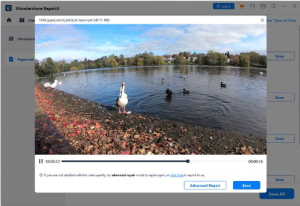
When the repair process is completed, press “Preview” and the “Save” button to store the repaired file on your device. If your MP4 file is severely damaged, switch to the “Advance Video Repair” mode. By doing so, you can access advanced features to repair your video file.
Part 4: Potential Benefits of Using Wondershare Repairit Toolkit
Repairit is an excellent MP4 video repair tool. In the following part, we have provided some of the benefits of using this tool.
- It can repair files or videos in any format and provides effective solutions to any corruption cases.
- There are offline and online repair modes available, so you can fix corrupt MP4 files with ease.
- This tool not only repairs damaged files but also enhances the quality of the file using AI technology.
- You can repair your corrupted data on your PC without worrying about the file size and number limit.
- Repairit uses proprietary data repair technology to restore any corrupted files within minutes.
Conclusion
This article concludes that if you cannot play back your MP4 files, they are corrupted. We discussed various reasons behind the corruption and learned various methods to repair them. Repairit provides you with online and offline methods for fixing corrupt MP4 files. It supports 18 file formats and can repair files from any device on your Mac and Windows.
Wondershare Repairit Free Download:
Click below to download Wondershare Repairit.